Hardware Compatibility Center

Supported Hardware for EZ-CAPSS and EZ-LEADS

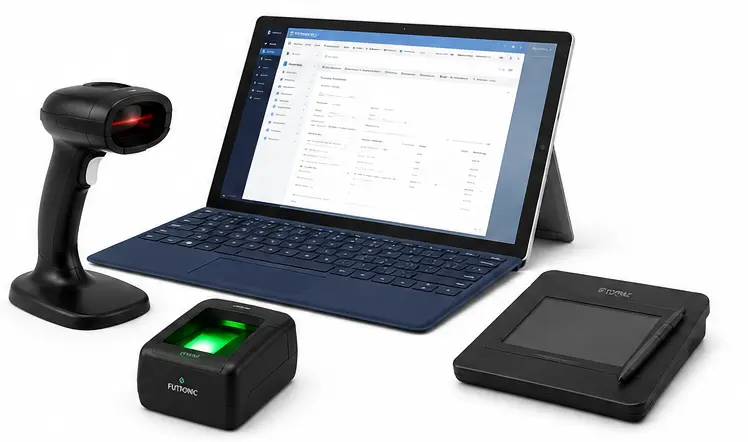
EZ-CAPSS works best when the store’s Windows device, ID-capture workflow, signature pad, and fingerprint scanner are planned together. This hardware guide gives prospective buyers, existing customers, and IT helpers a practical starting point before purchasing or replacing equipment.

If you are evaluating EZ-CAPSS, use this page to understand the main hardware paths. If you already have a specific model in mind, or if your hardware is not listed, contact EZ-CAPSS before you buy so we can help review the setup.

Quick platform summary

For new EZ-CAPSS deployments, Windows 11 Pro is the preferred platform. Windows 10 remains supported while the required device drivers and local components remain available. Standard Intel/AMD Windows devices — including desktops, laptops, and Intel/AMD-based Microsoft Windows compatible tablets — are the supported path for peripheral workflows such as signature pads and fingerprint scanners.

EZ-CAPSS is not limited to Microsoft Surface devices. Surface Go-style tablets are one possible Windows tablet option, but compatible Intel/AMD Microsoft Windows tablets from other manufacturers may also be appropriate when the full device, camera, scanner, signature, fingerprint, and mounting workflow is reviewed.

Apple devices are not supported at this time. EZ-CAPSS hardware workflows should be planned around Microsoft Windows devices.

ARM/Snapdragon Windows devices are not recommended at this time because peripheral drivers and SDK support can be limited, especially for fingerprint capture.

Hardware compatibility overview

Hardware / workflow Recommendation Status Connection / interface Windows/platform notes Details
Windows device Windows 11 Pro preferred for new installations. Supported Windows workstation/tablet Windows 10 supported while drivers remain available; Intel/AMD preferred. Windows devices
ARM/Snapdragon Windows device Do not standardize on ARM/Snapdragon for EZ-CAPSS hardware workflows. Not Recommended Windows ARM device Peripheral driver/SDK support may be limited. Windows devices
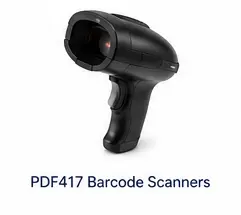
PDF417 driver-license scanner Use a USB HID keyboard-wedge PDF417 scanner behavior. Expected to Work USB HID / keyboard-wedge input Exact scanner behavior should be validated before purchase. PDF417 scanners
Camera-based ID capture Use camera capture as a supported ID-capture workflow where the Windows device and camera setup are appropriate. Supported Windows camera Setup, positioning, focus, lighting, and camera permissions matter. Camera ID capture
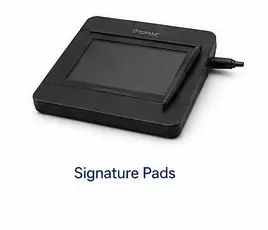
Signature pads Topaz is preferred for new installations; Scriptel local devices are supported. Supported / Expected to Work Local Windows device/component Exact model and suffix should be reviewed before purchase. Signature pads
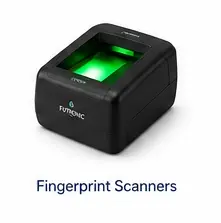
Fingerprint scanners Futronic FS88 is the standard supported option; FS88H is supported; FS10 has been tested. Supported Futronic local scanner/driver Windows 10/11 on Intel/AMD paths; ARM/Snapdragon not recommended. Fingerprint scanners
Magnetic stripe / older keyboard-wedge readers Existing-customer legacy support only. New installs should use current ID-capture paths. Legacy for Existing Customers Legacy wedge input Plan replacement with PDF417 scanner or camera capture. Legacy readers
Unlisted hardware Ask EZ-CAPSS to review the model before purchase. Contact EZ-CAPSS Before Purchase Varies Include model, Windows version, architecture, workflow, and product/spec URL if available. Contact EZ-CAPSS

Client configuration example

Additional hardware options used in a real EZ-CAPSS setup

Some EZ-CAPSS customers build their workstation around an Intel/AMD Microsoft Windows compatible tablet mounted in a fixed intake or counter area. Surface Go-style tablets are one example, not the only supported tablet path. The hardware below is included as a planning reference based on a major customer configuration, not as a blanket compatibility guarantee for every environment.

The Joy Factory Elevate II Surface Go kiosk mount

Example Surface Go kiosk mount

A wall or countertop kiosk enclosure can help keep a compatible Surface Go tablet positioned for customer intake, signatures, document review, or counter workflows where a fixed tablet station is preferred.

  • Example product: The Joy Factory Elevate II Wall / Countertop Mount Kiosk
  • Source compatibility: Surface Go 4, Surface Go 3, Surface Go 2, and Surface Go
  • Vendor SKU: KAM503B

View the Joy Factory mount

CTA Digital magnetic ID and card holder for card scanning

Magnetic ID and card holder

An ID/card holder can help keep cards positioned consistently during intake or scanning workflows. This may be useful for stores that want a more repeatable counter process around customer ID handling.

  • Example product: CTA Digital ID and Card Holder with Magnetic Attachment for Card Scanning
  • Vendor SKU: ADD-IDMAG
  • Workflow note: Validate physical placement and scanner workflow before rollout.

View the CTA Digital holder

Planning note: Mounts, holders, and counter accessories should be validated with the exact Windows tablet model, scanner/camera workflow, store layout, and installation requirements before purchase. Apple devices are not supported at this time.

Before you buy hardware

Before purchasing hardware for EZ-CAPSS, gather:

  • the exact manufacturer and model number;
  • any model suffix or hardware revision;
  • the Windows version on the computer or tablet;
  • whether the device is an Intel/AMD-based Microsoft Windows compatible tablet, desktop, or laptop;
  • whether the device is ARM/Snapdragon, which is not recommended for EZ-CAPSS hardware workflows today;
  • whether the device is an Apple device; Apple devices are not supported at this time;
  • the connection type, such as USB HID, local driver, Windows camera, or legacy keyboard-wedge input;
  • the workflow you need, such as ID capture, signature capture, fingerprint capture, or legacy reader replacement;
  • a product/specification URL if available;
  • the vendor return policy.

If you are unsure, use Contact EZ-CAPSS Before You Buy. A review can help prevent purchasing hardware that does not fit your deployment.

Choose the right hardware path

Driver-license ID capture

For dedicated scanner workflows, use PDF417 barcode scanner guidance. For camera workflows, use camera-based ID capture guidance.

Camera ID capture

Camera capture can reduce dedicated scanner hardware when the Windows device, permissions, lighting, and positioning are appropriate.

Signature capture

Topaz is preferred for new installations, and Scriptel local devices are supported. Exact model and suffix still matter.

Fingerprint / legacy readers

Futronic guidance is model-specific. Existing magnetic-stripe readers should be treated as legacy, not new-install direction.

FAQ

What hardware do I need for EZ-CAPSS?

Most stores should start with a supported Windows device, a supported ID-capture workflow, and any required signature or fingerprint hardware for their process. This page summarizes the main categories and links to detail pages for each device type.

Does EZ-CAPSS work with EZ-LEADS hardware?

EZ-CAPSS and EZ-LEADS can share the same hardware center because the hardware profile is closely aligned. EZ-CAPSS remains the primary context for this guide.

Does EZ-CAPSS run on Windows 11 Pro?

Yes. Windows 11 Pro is the preferred platform for new EZ-CAPSS installations.

Does EZ-CAPSS still support Windows 10?

Windows 10 remains supported while required device drivers and local components remain available. For new purchases, Windows 11 Pro is preferred.

Does EZ-CAPSS support ARM or Snapdragon Windows devices?

ARM/Snapdragon Windows devices are not recommended at this time because peripheral driver and SDK support can be limited, especially for fingerprint capture.

What if my hardware is not listed?

Contact EZ-CAPSS before purchase. Include the exact model, Windows version, processor architecture, and workflow you need.

Ready to review EZ-CAPSS?

If this hardware guide answers your main questions and you are evaluating EZ-CAPSS for your business, request a demo. If you need exact hardware validation or existing-customer support, use the contact route instead.