Hardware Compatibility Center
Signature Pads Supported by EZ-CAPSS
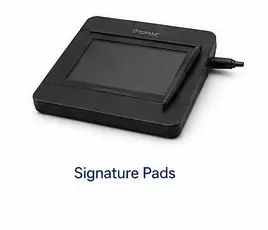
EZ-CAPSS supports electronic signature capture using compatible Topaz Systems and Scriptel signature pads, allowing customer signatures to be captured directly within the transaction workflow.
For standard EZ-CAPSS desktop installations, select Topaz models using the USB HID-compatible HSB-R interface.
Primary supported family
Topaz Signature Pads
Topaz offers a broad range of signature pads with different screen sizes, display technologies, connection interfaces, form factors, and application environments. For EZ-CAPSS, the model suffix and interface are more important than choosing a particular product family name.
Buyer guidance
EZ-CAPSS supports compatible Topaz signature pads used with standard local Windows desktop installations. Because Topaz offers multiple interface configurations, customers should verify the complete model number and suffix before purchasing.
- Confirm the exact Topaz model number.
- Look for the HSB-R suffix for a standard local EZ-CAPSS workstation.
- Avoid assuming that a similar-looking BSB or serial model is interchangeable.
Critical compatibility notice
Choose the Correct Topaz Interface
Topaz model lines are sold with different interface options. Use the comparison below before buying hardware for a standard EZ-CAPSS installation.
Recommended for EZ-CAPSS
HSB-R — USB HID
Use HSB-R models for a normal local Windows desktop workstation running the standard EZ-CAPSS workflow.
- Standard USB connection
- USB HID-style local device path
- Plug-and-play style workstation operation
- Recommended interface for standard EZ-CAPSS installations
Not for standard EZ-CAPSS desktop installations
BSB — Specialized remote/virtual environments
BSB models are not defective or inferior; they are designed for a different deployment architecture. Topaz describes BSB pads as virtual serial via USB devices for USB-redirection and COM-port-forwarded systems.
- Terminal Services / Remote Desktop scenarios
- Citrix Virtual Apps or Virtual Desktops
- COM-port redirection or forwarding
- Specialized remote or virtualized deployments
Buying a Topaz Pad for EZ-CAPSS?
Look for the HSB-R suffix when selecting a compatible Topaz signature pad for a standard local EZ-CAPSS workstation.
If you are unsure about a specific model, contact EZ-CAPSS before purchasing.
Contact EZ-CAPSS Before You Buy
Representative Topaz examples
Example Topaz Product Families
These examples show product families where Topaz publishes HSB-R or BHSB-R interface configurations. They are not a blanket compatibility promise for every model or suffix in the family.
SigLite LCD 1×5
Example compatible configuration: T-LBK460-HSB-R or T-L460-HSB-R interface path.
View Topaz family page
SignatureGem LCD 1×5
Example compatible configuration: T-LBK462-HSB-R or T-L462-HSB-R interface path.
View Topaz family page
SigLite 1×5
Example compatible configuration: T-S460-HSB-R interface path.
View Topaz family page
SignatureGem LCD 4×3
Example compatible configuration: T-LBK755-BHSB-R or T-LBK755SE-BHSB-R dual USB/serial path.
View Topaz family page
Supported alternative
Scriptel Signature Pads
EZ-CAPSS also supports compatible Scriptel signature pads. Compatibility may depend on the model, EasyScript or ProScript interface, software/driver requirements, and the customer’s workstation environment.
Have a Scriptel pad already?
Customers should verify the specific Scriptel model with EZ-CAPSS before purchase or deployment. Scriptel currently describes ScripTouch devices with USB communication interface choices including EasyScript and ProScript, and publishes product families such as SlimShield LCD, Slimline LCD, Slimline 1×5, Compact LCD, and Review LCD.
Have a Scriptel Pad Already? Contact Us to Confirm Compatibility.
Existing hardware
Already Own a Signature Pad?
You may not need to replace existing equipment. Send EZ-CAPSS the exact manufacturer and model information and we can help determine whether the device is appropriate for your installation.
What to send us
- Manufacturer: Topaz Systems or Scriptel
- Full model number from the back label or order record
- Interface/model suffix — especially important for Topaz
- Workstation type and Windows version
- Whether the workstation is local or uses Remote Desktop/Citrix
Where to look
For Topaz pads, the suffix appears at the end of the model number, such as HSB-R or BSB-R. If you only have a partial model number, take a photo of the device label and send it to EZ-CAPSS for review.
Workflow value
Why Electronic Signature Capture Matters
A compatible signature pad keeps signature capture inside the EZ-CAPSS transaction workflow instead of pushing staff into disconnected paper steps.
Capture signatures directly during a transaction
Reduce manual paperwork
Maintain transaction records electronically
Streamline customer processing
Reduce re-entry of signed information
Keep signature capture integrated with the EZ-CAPSS workflow
Signature-pad hardware supports the workflow, but it does not by itself guarantee legal or regulatory compliance.
Common questions
Signature Pad FAQ
Which Topaz signature pads work with EZ-CAPSS?
Topaz offers many product families and interface variations. For standard local EZ-CAPSS installations, use compatible HSB-R USB HID configurations and verify the complete model number before purchase.
What does HSB-R mean?
On the current Topaz product pages reviewed, HSB-R appears as the USB interface option for several signature-pad families. Topaz remote-installation documentation also refers to selecting “HSB (USB Type)” during SigPlus setup for supported USB pad configurations.
Can I use a BSB Topaz signature pad?
BSB configurations are designed for specialized remote or virtual environments, including Citrix, Remote Desktop, and USB-redirection or COM-port-forwarded systems. They are not the recommended interface for a standard local EZ-CAPSS workstation.
Does EZ-CAPSS support Scriptel?
Yes. Compatible Scriptel signature pads are supported. Specific model verification is recommended because Scriptel devices may use different interface and software paths.
I already have a Topaz pad. How can I tell if it will work?
Locate the full model number, including the suffix at the end of the model. Send that full model number to EZ-CAPSS before relying on the pad for your installation.
Should I purchase hardware before contacting EZ-CAPSS?
If there is any uncertainty, contact EZ-CAPSS first. We can review the model you are considering and help confirm whether it is appropriate for your installation.
Not Sure Which Signature Pad to Buy?
Send us the model you’re considering and we’ll help confirm whether it is appropriate for your EZ-CAPSS installation.
Contact EZ-CAPSS